AI Activity Dashboard, Labor Cost Updates, and Bug Fixes
We've introduced the AI Activity Dashboard for comprehensive employee activity visualization and analysis, plus simplified Labor Cost period selection and critical integration fixes.
Release dates: 11/26/2025
New feature: AI Activity Dashboard for employees
We've implemented Phase 1 of the AI Activity Dashboard for employees. This comprehensive AI-powered dashboard includes:
🟣 Activity Timeline Widget with two display modes
- Week view: Vertical timeline with daily columns and time intervals
- Month view: Simplified activity visualization for the month using short colored dashes
- Tracking 6 event types: Standup, Alert, Code (commits/PRs/reviews), Task, Chats (including conversations with PM Agent), and Meetings.
- Detailed tooltips display event type, time, participants, and source.
🟣 AI Summary Widget with AI-generated analysis
- Text summary of activity for the period with automatic highlighting of key insights and recommendations
- Productivity (0-100) and Involvement (0-100) metrics with color indicators (orange when <65, green when ≥65)
- Dynamic widget coloring with gradient pulsing when metrics are low
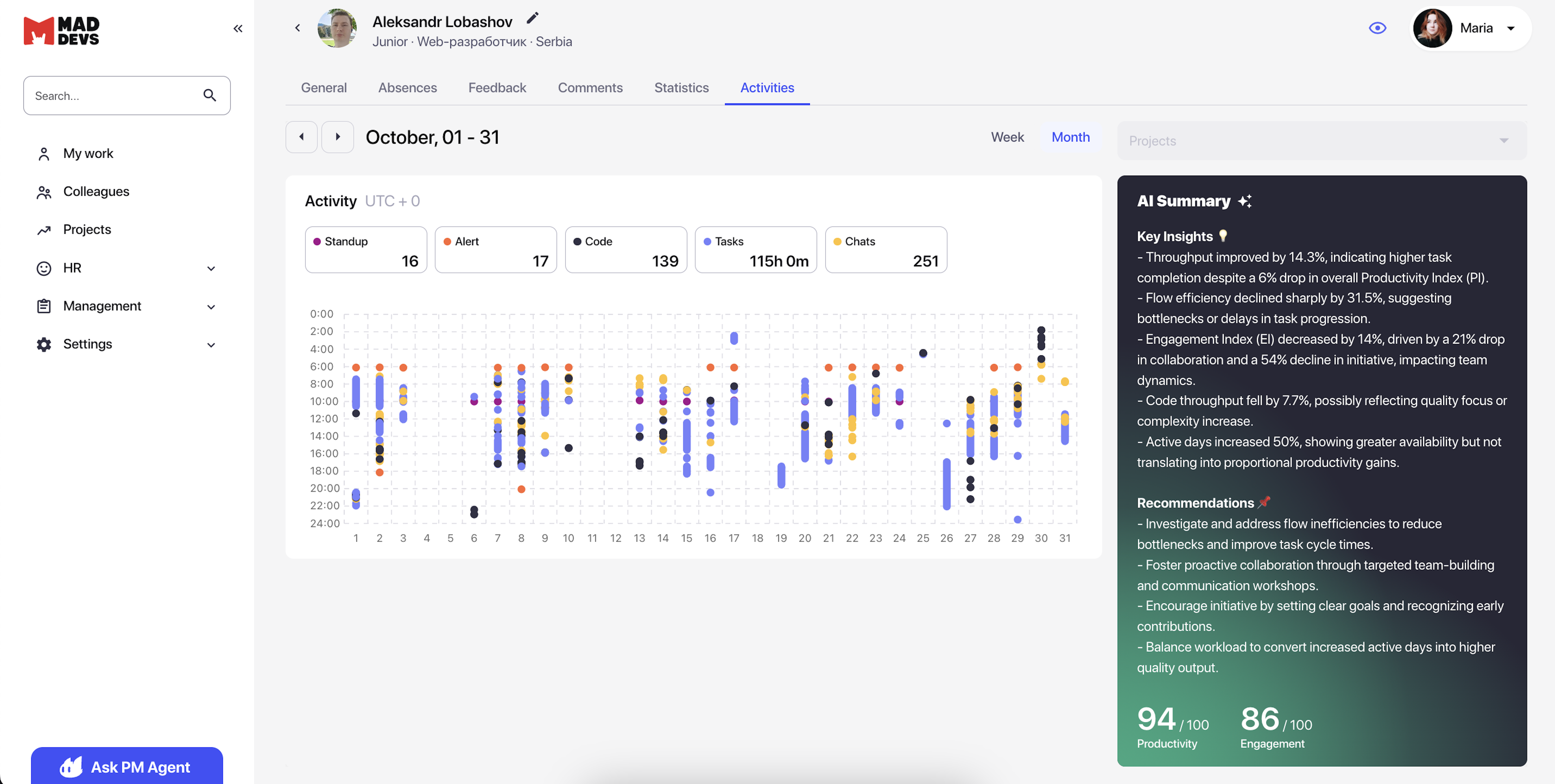
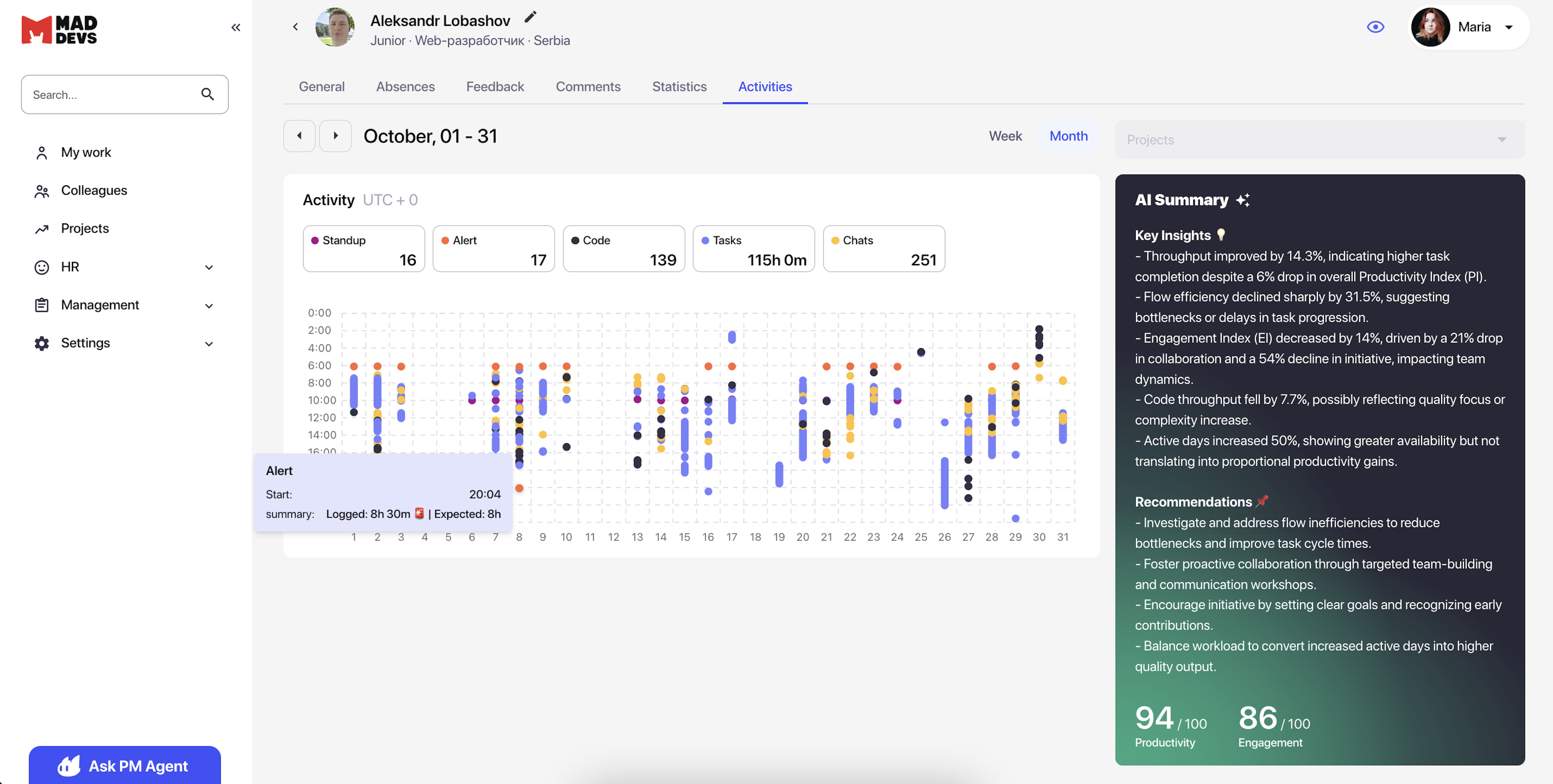
Managers and employees now have a powerful tool for visualizing and AI-analyzing work activity. You can instantly assess work patterns, productivity, and engagement over a week or month; AI automatically identifies signs of burnout (declining activity, reduced collaboration) and provides recommendations for 1:1s, enabling proactive team performance management and preventing employee burnout in early stages.
🔜 Coming soon: Additional widgets visualizing focus distribution across task types, communication, and projects; development of patterns for assessing manager productivity and involvement; project filtering; and several UI improvements to enhance user experience.
Updates, fixes, and improvements
- Simplified period selection in Labor Cost through a unified date picker. Replaced 4 separate date filters (Start Month, Start Year, End Month, and End Year) with a single "Select months" dropdown that allows selecting multi-month periods in one action. Improved first-click logic (immediately begins selecting a new interval without intermediate reset) and added a button to clear the selected period.
Users now have a significantly more convenient interface for selecting time periods in Labor Cost reports; choosing a date range now takes one click instead of four separate filters. The intuitive range picker simplifies period selection for viewing data across months. This is especially important when analyzing long-term trends in labor costs and project profitability. - Fixed Project_Employee_Cost extrapolation for Fixed/Ongoing dashboards. Changed the Net Cost extrapolation logic on the dashboard—now using the approach from Project Profits → Overall report: calculations use the last available Net Cost and hours logged specifically for the month when that Net Cost exists. For example, if the last Net Cost is from September, September worklogs are used instead of spreading current worklogs across all employee projects.
Impact: Financial analysts now have accurate and stable personnel cost calculations in Fixed/Ongoing projects. Spending and Net Cost values on the dashboard now match the Overall report, eliminating the issue of unpredictable cost changes when adding new worklogs in the current month. Hourly rates are calculated correctly based on historical data from the month with the last Net Cost, ensuring stability of financial metrics for active projects and accuracy of management decisions. - Added Manual Upload hours tracking in the Scope of Work and Activity widgets for Fixed projects. Fixed SQL query to include manually uploaded worklogs not linked to issues; now manually uploaded hours are counted in Project Dashboard widgets for Fixed projects if they fall between the project's Start Date and End Date (for Ongoing projects, manual worklogs are not counted due to lack of sprint linkage).
Fixed project managers now have a complete picture of labor costs: all hours, including those manually uploaded through Employee Hours, are correctly displayed in the Scope of Work and Activity widgets. This is especially important for projects with contract workers or when importing historical data, ensuring accurate calculation of completed work and progress tracking for a fixed scope. - Fixed Due Date handling in Notion integration. Adapted the Due Date field parsing logic to Notion's new data structure. The system now correctly processes both single dates (start) and date ranges (start and end), prioritizing end if populated, otherwise using start. This eliminated a critical integration error.
- Optimized AI response formatting and visualization for periodic tasks. Conducted comprehensive testing of AI responses across multiple prompts and models, and updated the prompt in the reformatting_stage to improve readability and structure. Also added a separate node to the pipeline for visual polishing of reports and ensured correct Markdown formatting display (headers, lists, and code blocks) for all model and prompt combinations.
- Added design guidance for periodic tasks in PM Agent. Researched and tested the concept of an additional question where the PM agent clarifies user preferences about report structure, design, and format when creating a periodic task. Developed two prompt variants for implementing interactive dialogue before forming the final task instruction.