Global Worklogs Visuals, Fixed-Scope Updates, and UI Fixes
We've added visual absence indicators to Global Worklogs, enhanced Fixed-Scope project dashboards with better deadline tracking, and fixed multiple UI issues across PM Agent and the platform.
Release dates: 10/02/2025
Global Worklogs report updates
Copy link
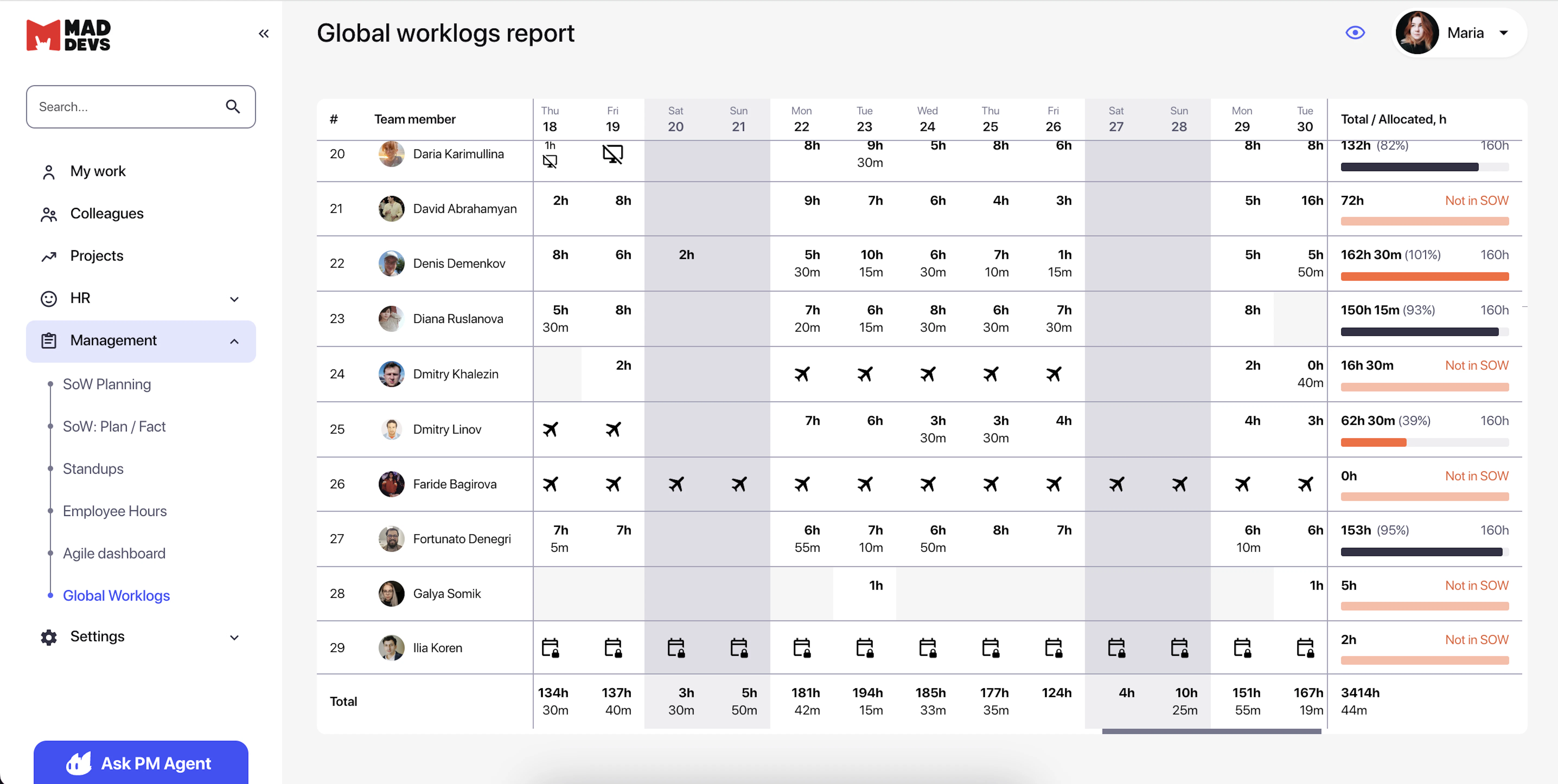
- Added visual display of absences in the Global Worklogs report. We've implemented a visual highlighting system for absence days in the Global Worklogs report, added absence type icons (vacation, sick leave, unpaid leave, etc.) that display in cells without logged time data, plus support for combined cases (when a user took an absence day but still logged time). When exporting data to Excel, all absence information is also exported. The report itself has been updated to match the new color scheme with a refreshed design.
HR specialists and managers now get an instant understanding of why worklogs are missing: for example, they can immediately see that an employee is on a legitimate vacation rather than simply forgetting to log time, which significantly saves time on data analysis, eliminates false alarms, and allows allows them to focus only on real work time logging issues.
Fixed-Scope dashboard updates
Copy link
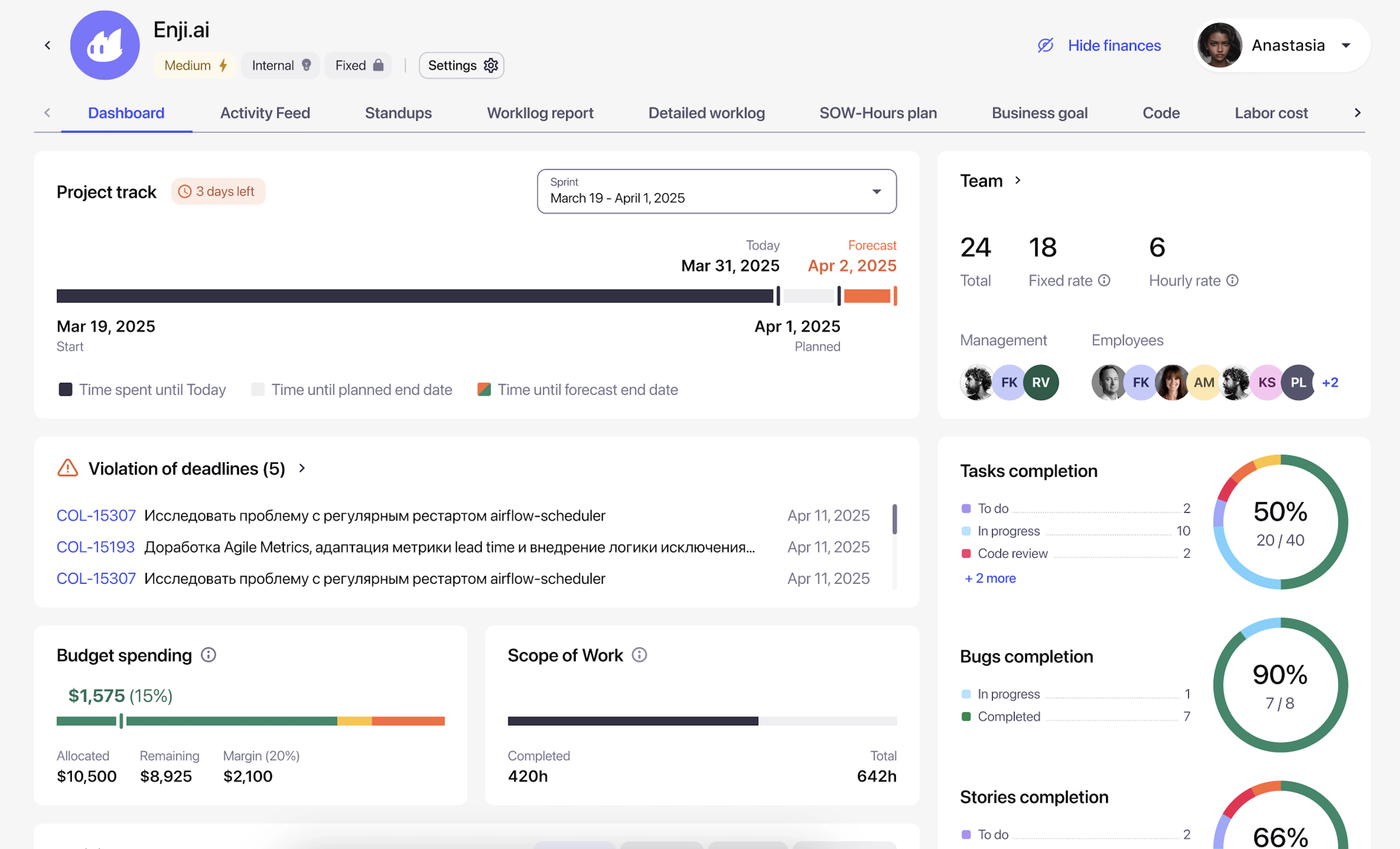
- Updated Fixed-Scope dashboard interface. The Project Track block has been redesigned with several key improvements. The remaining days indicator now turns red when fewer than 5 days remain. The progress bar has been enhanced to show Start/Today/Planned/Forecast dates in colored segments. The Violation of deadlines block now appears in a separate section with a warning icon and scrolling functionality. Additionally, the SoW widget has been renamed to 'Scope of Work' with an added hours progress bar. Financial metrics have been clarified by changing Margin → Remaining Budget.
Fixed-Scope project managers now benefit from significantly improved progress visualization. Critical schedule deviations are instantly visible, while overdue tasks appear highlighted in a separate block for quick response. The updated progress bar clearly shows the relationship between actual progress versus planned and forecasted timelines. This helps managers identify risks of deadline and budget overruns early in the project lifecycle.
PM Agent fixes and improvements
Copy link
- Fixed chat deletion from PM Agent history. Configured cascading deletion for the supporting many-to-many relationship table between chats and projects, eliminating errors when attempting to delete chats, including chats with created recurring tasks. You can now delete unnecessary or outdated chats without errors to maintain organization, which is especially important for active agent users with many accumulated conversations.
- Fixed text readability in PM Agent Tasks chat for dark theme. Changed notification text color for record creation in Tasks chat to a gray variant that displays correctly in dark theme, updated corresponding design variables.
- Fixed spacing in the "on" field for Weekly tasks in PM Agent. Added correct edge spacing in the day-of-week selection field "on" when creating/editing recurring tasks with the Weekly schedule type.
- Fixed the Ask PM Agent button and avatar functionality. Resolved issues with the PM Agent button, fixed logo merging with text, and removed disappearing animation on hover.
Other improvements
Copy link
- Restored absence type icons display in the Absences table. Fixed an error that prevented some records in the Absences table from displaying absence type icons (e.g., vacation, sick leave). All records now correctly show their corresponding icons.
- Restored the Paid hours field editing with restricted permissions. Fixed an error that broke the permission restriction functionality for the Paid hours field, restoring correct permission checking that allows only Stakeholder and DM roles to edit this field, while other roles (PM, HR, CTO) view it as read-only.
- Standardized avatar sizes throughout the system. Avatars have been set to strict sizes (24px, 40px, 62px depending on context), fixed company logo loading and replacement without page reload, eliminated name wrapping to new lines, and aligned spacing. Users now have a uniform avatar display across all system sections with correct proportions and spacing.
- Fixed visual defects in financial tables after the color scheme update. Eliminated broken content in the Expected Income details in the Margin by Project table, added correct spacing for avatars in all financial reports, and aligned text relative to avatars on the horizontal axis.