AI Agents vs Workflow Automation: What Should Your Business Automate With Rules, AI, or Both?

Analyze with AI
Get AI-powered insights from this Enji article:
A customer submits a request. Your team needs to check the account, understand the issue, decide who should handle it, and update the right systems. Some of those steps are routine. Others depend on what the request says and what has happened before.
That mix is why choosing between workflow automation and an AI agent is rarely a choice between two competing products. The useful question is: which steps should follow a fixed path, and which require a system to interpret context and decide what to do next?
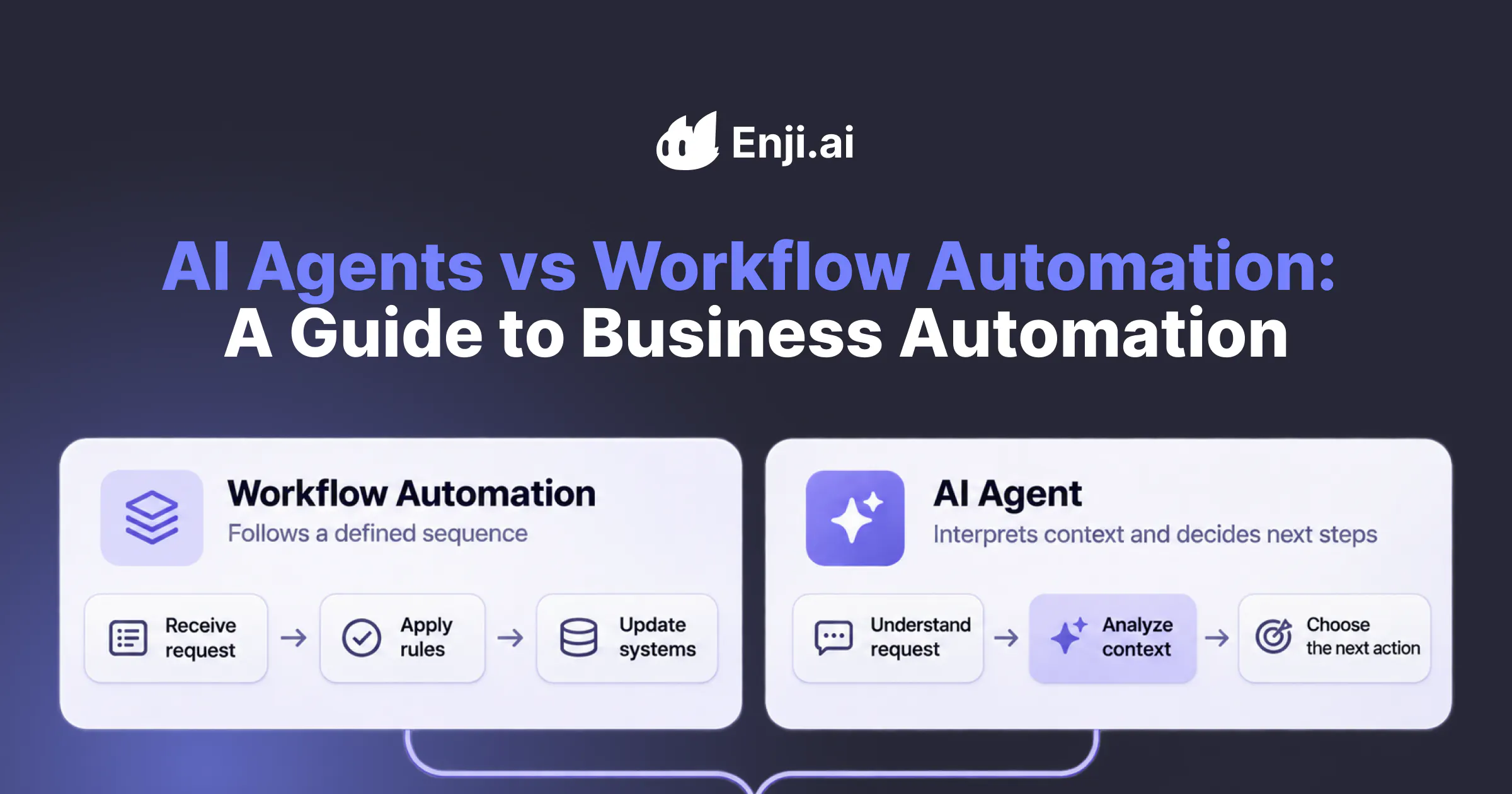
Use rules when the process should stay predictable. Use an agent when the next step depends on context. Combine them when one process contains both kinds of work.
AI agents vs workflow automation: the practical difference
A workflow automation follows a sequence defined before execution. It can include conditions and branches, but the rules for those branches are set in advance. An AI agent can interpret a goal, choose from available tools, and determine its next step based on what it finds. This is an architectural distinction, not a claim that every agent is fully autonomous or every workflow is simple. Anthropic describes the distinction in similar terms.
| DECISION FACTOR | WORKFLOW AUTOMATION | AI AGENT |
|---|---|---|
| Execution path | Defined in advance, including known branches | Selects next steps at runtime within its permitted scope |
| Input | Structured or consistently formatted | May be variable, unstructured, or incomplete |
| Decision logic | Explicit rules and conditions | Contextual interpretation and model-directed decisions |
| Behavior | More consistent across similar runs | Can vary and needs evaluation across realistic cases |
| Testing | Easier to reproduce with fixed inputs | Requires testing outcomes and behavior across varied inputs |
| Cost and latency | Often lower for routine, fixed tasks | Can be higher when reasoning and multiple tool calls are needed |
| Good fit | Repeatable processes with known exceptions | Bounded tasks where the right next step depends on context |
There is also a practical middle option: an AI-assisted workflow. The main sequence stays fixed, while a step uses AI to classify a message, extract fields from a document, summarize a case, or draft a response. A rule or person then checks the result before the workflow continues. IBM describes AI workflows as a broader process in which AI can support individual steps; the process does not have to hand control to an agent throughout.
Use workflow automation when the process should stay predictable
Choose a workflow when your team can describe the steps and decision rules before a run begins. The more often the process repeats in the same way, the stronger the case for explicit rules.
Examples include:
- moving approved data between systems on a schedule;
- creating a standard record when a form is submitted;
- routing an invoice by department, amount, or cost center;
- sending a notification when a known condition is met;
- following a fixed approval chain;
- preparing a recurring report from specified fields.
For example, a purchasing request might always need a requester, department, amount, and cost center. A workflow can reject incomplete forms, route complete requests to the right approver, and record the decision. It does not need to infer what "a reasonable purchase" means if the policy already defines the thresholds.
A predictable path is easier to test: provide the same input, verify the expected result, and inspect the branch taken. Rules still need maintenance when policies or systems change, but expected behavior remains visible in advance.
Do not add an agent only because the platform makes it possible. If a clear rule handles the task reliably, agent reasoning may add cost, delay, and behavior that is harder to reproduce without improving the result. Anthropic recommends starting with the simplest approach that meets the task’s needs; Google Cloud likewise notes that predictable, highly structured work may be better served by non-agentic approaches.
For more on fixed processes across connected tools, see workflow orchestration.
Use an AI agent when the next step depends on context
An agent becomes useful when a process cannot be fully mapped before each case arrives. The input may be incomplete, the relevant information may sit in several systems, or the next useful action may depend on what an earlier search reveals.
Consider a service request that says, "The equipment stopped again after yesterday's change." A rigid workflow can route the message based on a form field or keyword. An agent could look up the account, find the recent change, compare it with earlier incidents, and prepare a summary for a support specialist. The agent's value is in selecting and interpreting relevant context, not in having unlimited authority to repair the equipment or change a customer’s contract.
Agents can fit tasks such as:
- Investigating why a request or project is blocked.
- Finding relevant evidence across several business systems.
- Researching an exception that does not match known categories.
- Deciding which information matters to a case.
- Recommending a next step from a defined set of permitted options.
Google Cloud describes agents as useful for open-ended, goal-focused tasks that may require autonomous decisions and multiple steps. That does not mean "open-ended" should mean uncontrolled. Before an agent acts, define the tools it can use, the data it can access, the decisions it may make, when it must stop, and which actions require approval. For sensitive or consequential decisions, an agent can gather evidence and make a recommendation while a person decides.
A one-time AI call may be enough for summarizing a document or classifying feedback. The distinction is whether the process needs runtime decisions about how to proceed.
Use both when the workflow contains rules and judgment
Most business processes are not uniformly predictable or ambiguous. They have a stable backbone with a few steps that need interpretation. In those cases, keep the sequence and consequential actions controlled, and use AI where context changes the decision.
A common pattern is:
Trigger → deterministic checks → agent interpretation → policy or approval gate → deterministic action
For example, a workflow can collect a customer’s request and account history, check required fields, and confirm that the case is within policy. An agent can then compare the request with prior interactions and draft a recommended response. A rule can block sending if the response includes a refund above a set limit. A human can approve that exception. Once approved, the workflow sends the response and records the outcome.
The agent does not need to control the whole process to be useful. This division gives the process a predictable structure while leaving room to interpret cases that do not fit neatly into predefined branches. It also makes ownership clearer: rules govern allowed actions; AI helps interpret evidence; people handle decisions whose impact or ambiguity warrants review.
A useful boundary is to let the agent prepare or recommend actions first, then expand its permissions only after the team has evidence that it handles the relevant cases reliably. AWS guidance frames agent adoption around task suitability, risk impact, and return on investment; its risk discussion also distinguishes levels of human involvement. The right level of autonomy depends on the cost of an error and the organization’s ability to detect and recover from one.
How to choose between rules, an agent, or both?
Use the questions below to assess each step in a process. This is a practical decision aid, not an external standard. A single business process may need different answers at different stages.
| QUESTION | RULES OR WORKFLOW | AGENT | HYBRID |
|---|---|---|---|
| Can the steps be defined before execution? | Yes, including known branches | Not completely; the path depends on what is found | Most steps are known, with a few contextual decisions |
| Are inputs predictable? | Usually | Often varied or unstructured | A mix of structured records and variable information |
| Does the next step require interpretation? | Rarely | Frequently | Only at specific points |
| Must similar cases produce the same action? | Yes | Not necessarily; behavior is evaluated against boundaries | Core actions stay consistent; interpretation may vary |
| Can exceptions be listed in advance? | Most can | Many cannot | Some can; unusual cases are escalated |
| What is the impact of an error? | Best when rules can prevent or contain it | Requires clear limits and monitoring | Often appropriate when checks and approvals can contain risk |
| Can the result be checked objectively? | Usually | It should be checked where possible | Checks at important handoffs |
| Is human judgment needed? | A fixed approval step | Escalation when the agent reaches a limit | Selective approval for consequential or uncertain cases |
Cost, speed, and reliability matter too. A high-volume process with stable inputs may favor rules because the same sequence can run without repeated model reasoning. An agent may be justified for a lower-volume task if interpretation improves a high-value outcome. Compare the full cost of running and reviewing each option with the current effort; do not assume that either automation model is cheaper in every situation. AWS recommends assessing the economics and risk of the task alongside its technical fit.
What happens when you choose the wrong approach?
An agent used for a task governed by a clear rule can make the process more expensive and slower, while adding outputs that vary between similar cases. The team may also have to test, monitor, and review a system whose reasoning is harder to reproduce. If the agent has broad permissions, an interpretation error can affect more than the text it generates.
A rigid workflow used for a task that depends on context can accumulate branches for every new exception. Staff may end up manually handling anything the rules do not recognize. As inputs change, that branching logic can become difficult to maintain, and the workflow can still fail to capture evidence that does not fit its fields.
A practical warning sign is repeated manual correction. If staff routinely fix the same missing field, the workflow may need a better validation rule or an AI extraction step. If they repeatedly override a suggested action because the system missed context, the process may need better access to evidence or a human decision point. Diagnose the failure before changing the whole architecture.
Example: automate a weekly management update
Suppose an operations team prepares a weekly update on delivery, open risks, and follow-ups. The report draws on project records, support tickets, and status notes. Some work is mechanical; deciding which change is a genuine risk requires context.
Keep these steps deterministic: run the process on schedule, collect data from specified sources, use the same report structure, check required fields, distribute the approved report, and create standard follow-up tasks from agreed rules.
Use an agent for bounded interpretation: compare this week’s updates with prior reports, identify changes that may matter, find related blockers, and explain why an item may need attention. The agent should cite or link the records it used so a manager can check the evidence.
Keep people responsible for consequential decisions: managers decide whether to change priorities, commit additional budget, renegotiate a customer commitment, or escalate a risk to leadership. The system can prepare evidence and suggest follow-ups; it should not silently make commitments on the team’s behalf.
That design avoids asking a model to recreate the report process on every run. It also avoids forcing every possible combination of project signals into fixed rules. The team can change the report template or approval policy without rebuilding the agent’s interpretation task from scratch.
How to pilot the right automation model?
Start with one recurring process that has a clear owner and a visible outcome. Map its steps, then label each one as predictable, judgment-heavy, or mixed. Avoid automating a process the team does not yet understand; otherwise, the system may make a poorly defined process faster without making it better.
Automate the predictable steps first. For mixed steps, try an AI-assisted workflow before giving an agent control over a sequence. Introduce agent behavior only where variable inputs or contextual decisions justify it. Define its allowed tools and data, permissions, approval points, stopping conditions, and recovery path before expanding the scope. For agent evaluation guidance, see agent evals.
Test with ordinary cases and awkward ones: missing information, conflicting records, policy exceptions, stale data, and requests that should be rejected or escalated. Measure completion time, human effort, exception rate, correction rate, cost per completed case, and reliability. Track how often people approve, edit, or reject an agent’s recommendation. A pilot should show whether the new design improves the outcome enough to justify its running and oversight costs.
What to look for in an automation platform?
Once you know which steps need rules and which need contextual interpretation, evaluate platforms against that design:
Repeatable workflows: Can the team define and reuse an approved sequence across connected tools?
Context access: Can AI retrieve the current information it needs from relevant business systems, with appropriate access controls?
Separation of reasoning and execution: Can AI analyze or recommend without automatically receiving permission to act?
Permissions and approvals: Can access be limited by role, and can approval be required for consequential steps?
Cross-tool execution: Can the process work with the systems the team already uses?
Traceability: Can reviewers see what information was used, what actions occurred, and what result followed?
Evaluation: Can the team test realistic cases and monitor quality, cost, and errors over time?
Choose a platform that supports the process’s level of control: a stable sequence with approvals, contextual interpretation, or both.
For another evaluation framework, see our related article:
The decision in one sentence
Keep the path fixed where the rules are clear; use an agent where context changes the next step; add human approval where a mistake would carry meaningful consequences. Then test the design against real exceptions and expand only when the results justify it.
Combine repeatable workflows with context-aware AI
Use Process Builder for work that should follow the same approved path, and PM Agent where real project context and judgment are needed.
See Process Builder