New Linear Integration and AI-Powered Analytics
Teams working with Linear now have automatic task and activity synchronization, while PM Agent has learned to build charts and work with large datasets without quality loss. Additionally, we've unified data access, standardized report formatting, and added Jira component tracking for more accurate analysis.
Release dates: 02/11/2026
New integration: Linear.app
We've implemented integration with Linear.app through a new Integrations Service built on Prefect 2.x. We created a new Integrations Service microservice with a unified integration protocol, using Prefect 2.x for synchronization orchestration. We've also implemented full integration with Linear.app, including parsing of tasks and worklogs through commands, comments, statuses, assignees, and deadlines. The integration includes support for multiple boards in one project and automatic change synchronization, and we've adapted the legacy backend to receive data.
Teams using Linear now have full-featured integration with Enji; all tasks, worklogs, and activities from Linear automatically sync into the system alongside Jira, Azure DevOps, and other sources. Now developers can log time directly in Linear, while managers see team activity in a unified Activity Dashboard regardless of which task tracker is being used. The new Integrations Service architecture with Prefect ensures managed, observable, and restartable synchronization processes with monitoring through Prefect UI, while the unified integration protocol simplifies adding new platforms without code duplication. This is critical for scaling to dozens of integrations and supporting the diverse tool ecosystems of enterprise clients.
New feature: data visualization through charts in PM Agent
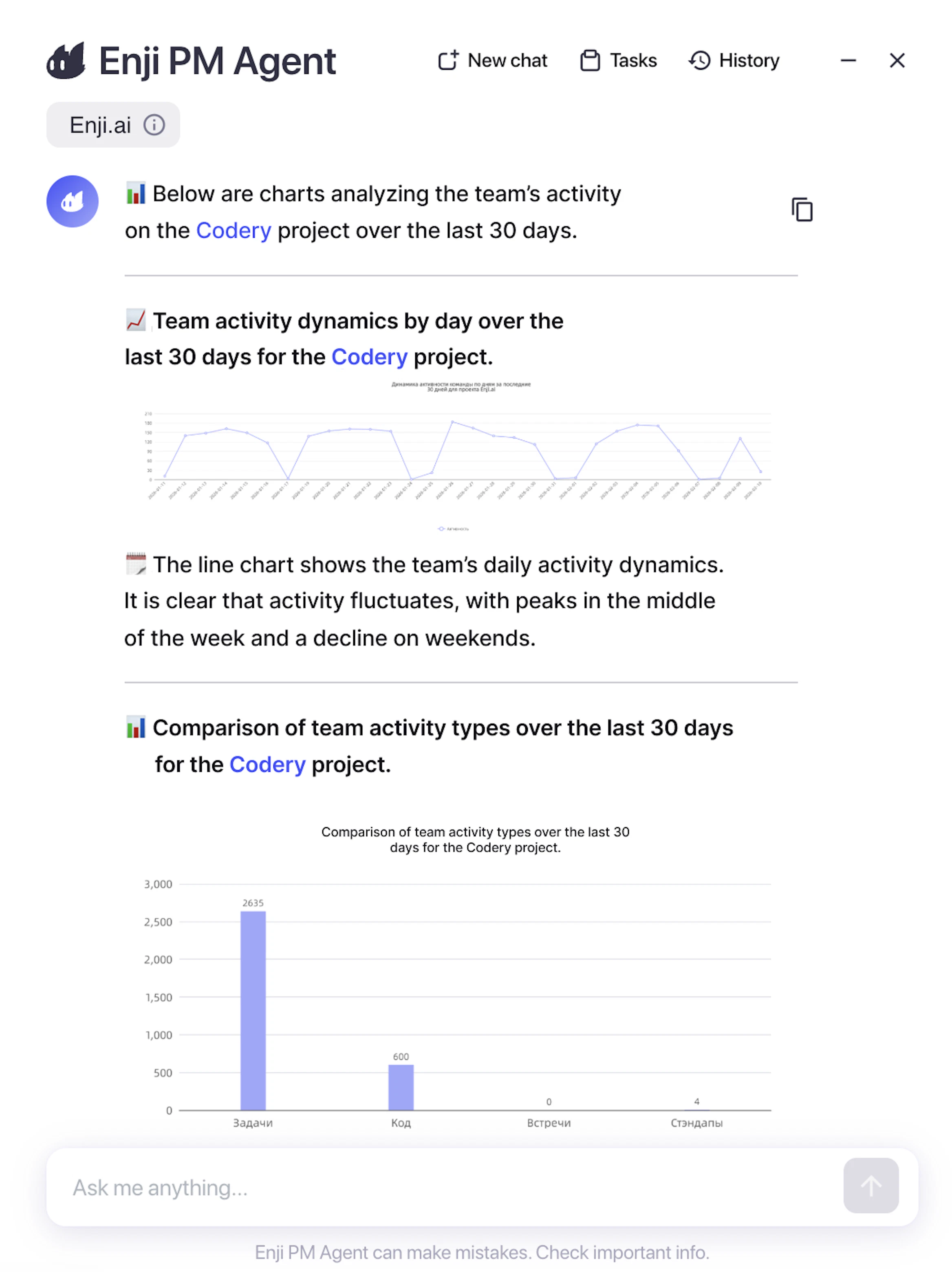
We've implemented data visualization through charts in PM Agent and email reports. The chat uses charts based on chart.js with Enji's color palette and responsive design. For email reports, charts are generated as static PNG images in base64. Users now have a powerful visual analytics tool where PM Agent generates charts for time distribution, productivity dynamics, and team comparisons directly in chat or email reports. Visualization of complex data simplifies anomaly and pattern detection, enabling managers to make data-driven decisions more quickly.
PM Agent improvements
Integrated the Snowball context compression method in Copilot for handling large contexts. We've implemented and tested the innovative Snowball context compression approach for processing contexts that exceed model limits (15-20k tokens for local models). We've integrated token calculation for each LLM call, implemented a Summary approach with automatic data chunking based on the LLM agent, chunk relevance classification to the query, sequential response updates through each chunk, and final formatting. We've ensured a failsafe mechanism for rare cases of large context windows in the sql_tool_answer node.
➡️ Impact: PM Agent gained the ability to work with massive datasets without quality loss. Now queries like "analyze all project activities for the year" are correctly processed even with contexts of 773k tokens through chunking into 12k segments. The system automatically extracts all relevant information with consistent and logical answers, and the method works for both cloud and local models. This is critical for enterprise clients with data privacy requirements using self-hosted LLMs, eliminating the limitation on the size of analyzed data while maintaining information extraction accuracy.
Unified Copilot data access through database views for BotFarm and the meeting bot. We've implemented Copilot's transition from direct queries to BotFarm and Meeting Bot services by using unified database views. We've isolated the data retrieval mechanism through centralized views instead of scattered API calls, ensuring data structure consistency and simplifying the logic for extracting information about chats, meetings, and team communications.
Standardized formatting for periodic task reports. We've updated PM Agent prompts for uniform, clean formatting of all reports: eliminated inconsistency between neat reports and those containing visual noise, created a standardized structure with section headings, clickable task titles and ticket links, bulleted actions, and consistent use of bold text for key information. All task keys are now links regardless of context.
Added the Component field from Jira to the PM Agent context. We've implemented logic for processing Jira components in database views and on the Copilot side, ensuring the correct extraction of component data through existing integrations. The agent now considers components when searching for tasks, generating reports, and analyzing teamwork, allowing filtering and grouping of tasks by architectural system components. Users gained the ability for targeted analysis of work on product components, which is critical for product teams with microservice architectures or modular monoliths, where it's important to track progress and costs by individual components for planning refactoring, technical debt, and resource distribution across system parts.
AI Activity improvements
Added tracking of "Opened a Merge Request" event in the Focus on Activities calculation. We've fixed a critical bug in code activity counting. The "Opened a Merge Request" event now correctly participates in metric calculation for the Focus on Activities widget in the Work category. We've corrected the percentage calculation formula to include all Code event types (commits, MR creation, reviews), and eliminated the discrepancy between manual activity counting in Activity logs and automatic counting in the widget.
Other improvements
Fixed handling of users without Telegram usernames in the bot. We've eliminated incorrect handling of users with deleted or missing Telegram usernames. Now, the bot no longer adds "@None" to messages when mentioning a user without a username, and correctly handles the case of missing Telegram accounts. After adding a username, the system automatically starts correctly mentioning the user @username.
Made the project name in the project report clickable for quick return. We've implemented clickability of the project name in the project report header. Now, clicking the name always navigates to the leftmost tab (first available tab) regardless of the current location, and the link is properly highlighted in both themes (light and dark). Users gained a quick way to navigate projects with many tabs, eliminating the need to "scroll back" through tabs.