New Step-by-Step Project Creation Flow and Enhanced Integrations
Added a step-by-step Create New Project process, improved the Linear integration mechanism, and expanded PM Agent capabilities. Updated activity analytics in Focus widgets for more accurate team engagement assessment.
Release dates: 02/17/2026
NEW FEATURE: step-by-step Create New Project flow
We've implemented a new step-by-step Create New Project flow. We've developed a comprehensive project creation wizard that guides users through all setup stages from zero to a fully functional project:
Step 1 – Company settings: Displays only for empty instances without existing projects, allows setting the company name and uploading the company avatar, and is skipped when creating subsequent projects.
Step 2 – Basic project data: Name, project type, start and end dates, avatar upload, and real-time validation with the Next button activated only when required fields are filled.
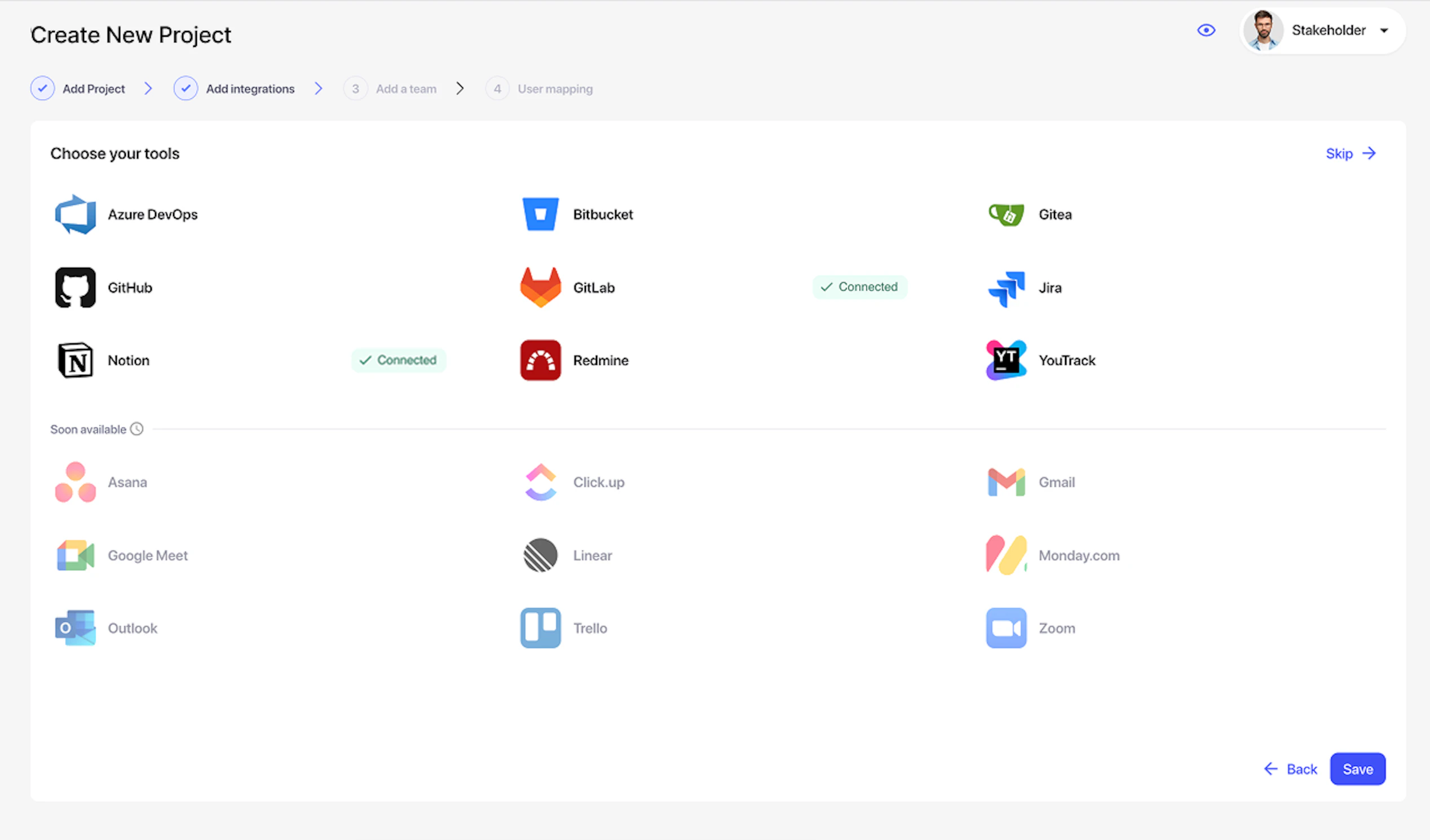
Step 3 – Integration setup: Jira, Azure DevOps, YouTrack, Redmine, Notion, GitLab, GitHub, Gitea, Bitbucket with a new Test Connection mechanism, board selection, and start/final status configuration for workflows.
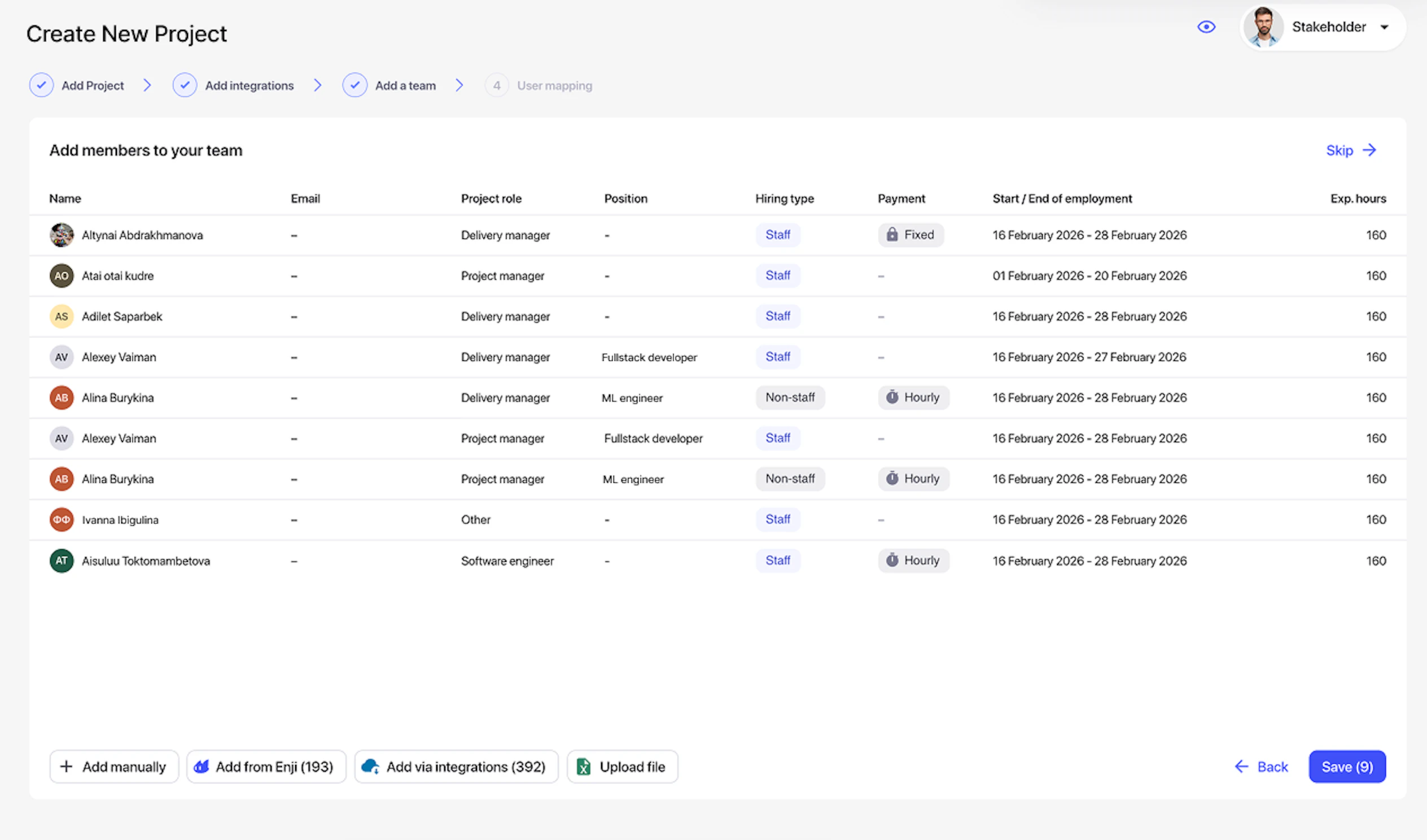
Step 4 – Team addition: Four ways to add employees, from existing Enji users, through users found in integrations, by manual entry, or through Excel upload using a template.
Step 5 – Updated account mapping interface from trackers and repositories, excluding already mapped users and auto-filling data (if previously configured).
Key improvements in the new flow:
- Progress saves automatically after each step
- Incomplete projects display on the Project list with a progress indicator and Continue Setup button
- When returning, the wizard opens from the last completed step with saved data
Impact: Our clients now have an intuitive guided onboarding process instead of a fragmented setup across different system sections. Complete project setup with integrations and team is now accomplished in a single session. Auto-save allows interruption and continuation anytime without data loss, significantly reducing time-to-value for new clients and lowering support load during enterprise client onboarding with multiple integrations.
Linear integration improvements
Added a special Linear integration mode for non-standard usage. We've implemented an additional Linear integration operation mode that automatically activates when connecting via URLs containing 'project-name' instead of the standard 'namespace'. In this mode, Linear team maps as a board/project in Enji, all task labels are preserved in components, multiple labels are supported for bug and epic detection, and both modes operate in parallel without conflicts.
Impact:
- Clients using Linear in non-standard ways now have correct integration without needing to restructure their Linear workflows.
- Eliminated incorrect data mapping issues when using a project-level connection instead of a workspace-level connection.
- Automatic mode detection via URL eliminates manual setup and the risk of configuration errors. By saving all labels into components, we ensure full visibility of task categorization within Enji analytics, which is critical for enterprise clients with established workflows in Linear.
PM Agent improvements
Added PM Agent dialog export in MD and PDF formats. We've implemented an export button in the PM Agent dialog menu; clicking opens a pop-up with format selection (Markdown or PDF). Files are generated with names based on the first chat message date, exporting complete dialog history while preserving structure and formatting. Users can now save and share PM Agent work results: analytical reports, generated charts, and insights can be exported in convenient formats for management presentations, decision archiving, or colleague handoffs without screenshots. This is especially valuable when working with long analytical sessions containing tables and charts, and it eliminates friction when collecting feedback on agent response quality.
Implemented the PM Agent request cancellation button. Added an active request cancellation button in the PM Agent interface with coordinated changes across three levels:
- Frontend: button display and state management
- Backend: cancellation signal processing
- Copilot: LLM request and processing pipeline interruption
Users now have control over request execution. When accidentally sending a request, incorrectly formulating a question, or experiencing overly long agent responses, processing can be immediately interrupted instead of waiting for full completion, significantly improving UX during iterative agent work and reducing infrastructure load by stopping unnecessary heavy requests.
Other improvements
Simplified and calibrated the Focus widgets calculation math in the Activity service. Reworked activity unit counting logic in Focus widgets. The system now counts each entity quantity (1 unit per event), with chats and meetings receiving +1 point for every 5 minutes of duration, ensuring correct task type classification (Bug vs Feature) with dynamic determination during renaming. Impact:
- Focus on Activities, Focus on Tasks, and Focus on Projects widgets now have transparent and predictable calculation logic.
- Eliminated discrepancies between manual and automatic counting.
- A simple formula (event count + duration bonus for chats/meetings) provides user-understandable metrics without black box complexity.
- Correct communication time accounting (longer meetings or chat sessions carry greater weight in Communications) ensures a fair Work vs Communications balance in analytics.
These improvements are critical for objective engagement assessment across different roles, from developers to managers, spending most of their time on calls.
Fixed user profile avatar change button behavior. Eliminated 500 error when attempting avatar deletion via the "×" button; removed full avatar deletion capability. Instead, we implemented image replacement, aligning with design and proper UX logic: the "×" button no longer appears as deletion but initiates new image selection.
Disabled standup format validation in the Telegram bot. Removed the recurring standup format validation in the Telegram bot. The bot now accepts standups in any format without sending error messages. Confirmation of receipt is still provided via emoji reaction.