AI Project Management: Ключевые термины
Что такое ai project management
What Is AI Project Management? A Practical Guide for Engineering Leaders and Managers
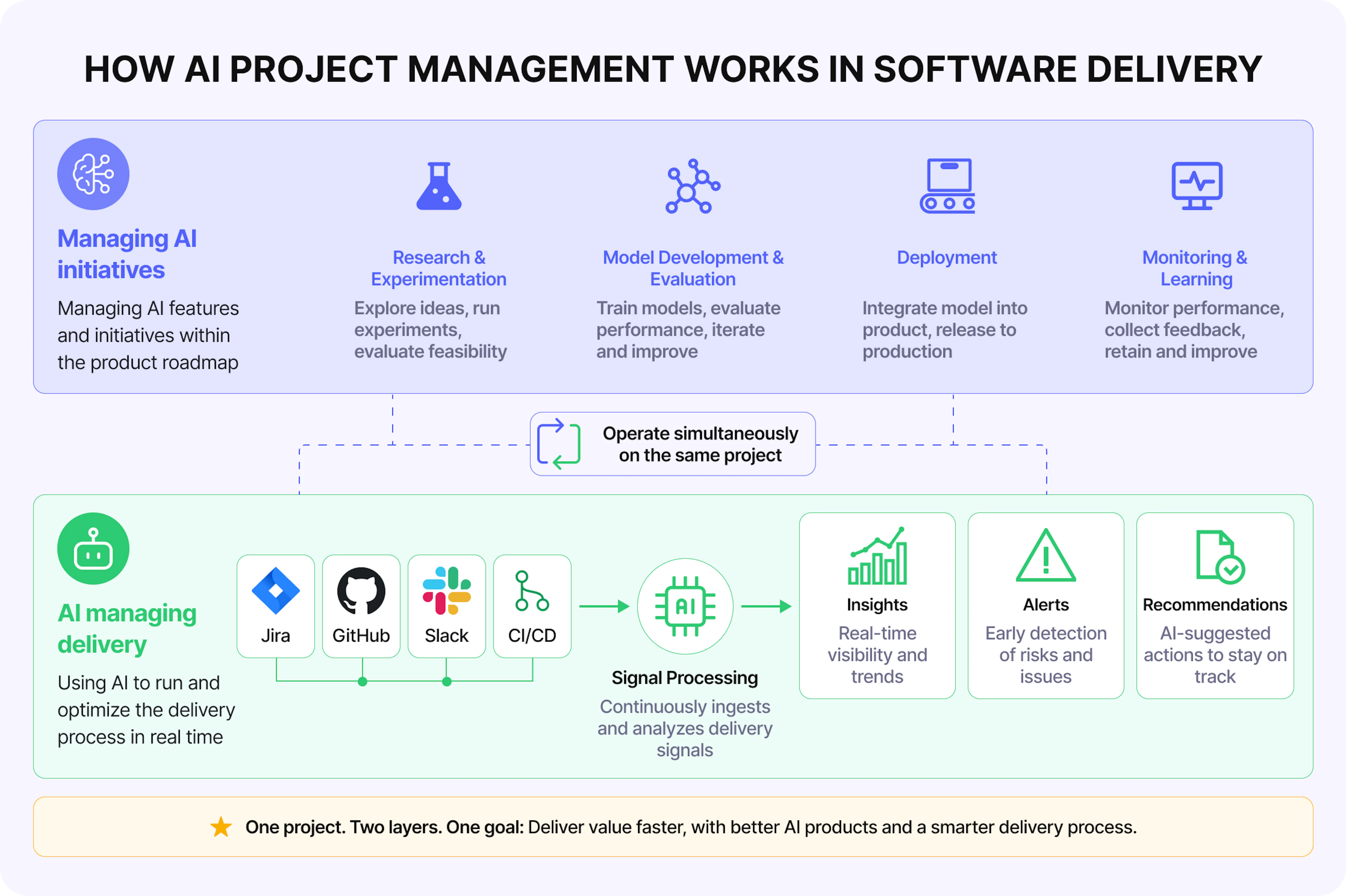
AI project management is the application of structured methodologies, automated tools, and machine learning capabilities to plan, execute, monitor, and deliver projects. It covers two converging practices: managing AI development initiatives and using AI-powered agents to run any project — automating status tracking, surfacing risks, and eliminating the routine coordination work that consumes a project manager's day.
The distinction from traditional project management is not about replacing human judgment – it is about changing how quickly and clearly the context for decisions becomes available. Where a weekly status call reveals a risk that has already cascaded, an AI-based system detects the signal as it develops.[1]
Key application categories:
- Automated data aggregation – continuous collection of project signals from Jira, GitHub, Slack, calendars, and worklogs without manual input.
- Risk forecasting – a leading indicator tracking that surfaces delivery risks 2-4 weeks before they become visible in burndown charts.[2]
- Report generation – scheduled and on-demand summaries produced without PM involvement.[3]
- Operational task automation – standup reminders, inactivity alerts, recurring task creation.[4]
Why can't engineering teams afford to ignore AI in project management?
The core problem is not a lack of data – it is that project data lives in too many places. Jira holds tickets. GitHub holds commits and PR status. Slack holds decisions that never made it into any tracker. Google Calendar holds the context of who was in which meeting when the deadline changed. Leadership is always one step behind because assembling this picture requires manual effort that nobody has time for.
The cost is measurable. The average project manager spends 3-4 hours per week creating status reports – more than 150 hours annually – on documentation of work rather than work itself. At scale, a 20-person PMO consumes 100–200 person-hours per week on status reporting alone. One documented program manager case reduced weekly reporting time from 12 hours to 90 minutes after implementing automated aggregation.[5][6][3]
The downstream effects go beyond lost PM time:
- Delayed decisions. Leadership receives project data that is already days old, making risk management reactive.[7]
- Budget overruns. AI-driven forecasting makes budget overruns 28% less likely than manual approaches by catching cost signals earlier.[8]
- Missed risks. AI detects quality issues in project deliverables 30% earlier than manual reviews, according to McKinsey data.[8]
- Scope creep. 52% of projects face scope creep, partly due to reporting inaccuracies that could be caught with automated data validation.[3]
For CTOs and VPs of Engineering, the symptom is familiar: finding out about a blocked initiative during a steering committee meeting rather than three weeks before it became a blocker. For engineering managers, it is spending the first two hours of every Monday morning pulling numbers from four different tools. For project managers, it is asking the same team members to update ticket statuses and getting no response.[1]
Spot project risks before the next status meeting
See how Enji surfaces delivery signals from Jira, GitHub, Slack, and worklogs before they become delays.
How does AI project management actually work?
AI project management operates through a four-stage pipeline that converts raw project activity into actionable insight:
Data connectors → Context aggregation → AI reasoning → Actionable output
1. Data connectors link to the tools teams already use – task trackers (Jira, Linear, Azure DevOps), code repositories (GitHub, GitLab, Bitbucket), communication platforms (Slack, Telegram, Microsoft Teams), calendars, and worklogs. No manual data entry required.[9][4]
2. Context aggregation normalizes data from these sources into a unified project model. Task status transitions, PR cycle times, commit frequency, standup responses, capacity changes, and budget consumption are correlated into a single project context. This is what Enji calls the Project Brain – a structured knowledge base that holds all project context: goals, rules, team configuration, internal documentation from Confluence or Google Docs, and real-time activity signals. The accuracy of any AI response depends directly on the completeness of this context.[10][4]
3. AI reasoning applies natural language processing and machine learning to the aggregated context. The agent answers questions about project status, risks, blockers, and next steps – not by searching the internet, but by querying the verified project data it holds. Enji PM Agent combines Text2SQL and RAG (retrieval-augmented generation) approaches to ensure every response is grounded in actual project data, not generated estimates.[11][1]
4. Actionable output reaches the right person in the right format: a chat response to a PM's direct question, a scheduled report emailed to leadership every Monday, or a Slack alert when a WIP threshold is crossed.[4][9]
The role of the AI agent is not to replace the project manager – it is to act as the project's single source of current context, so that decisions are made with real data rather than on what someone remembered from last week's standup.
Core capabilities of AI project management
Strategic alignment and goal tracking
AI tools connect delivery work to business objectives by continuously measuring whether sprint output is moving toward stated goals – not just tracking whether tasks are marked Done.
Effective strategic management requires that every layer of an organization – from individual contributor to leadership – pulls toward the same objectives. AI project management makes this alignment visible and measurable in real time, rather than quarterly.
In practice, AI agents can be configured with company OKRs or project-level goals, then monitor delivery metrics against those goals continuously. When sprint velocity trends downward while a key Q3 commitment remains at 30% completion, the agent surfaces this gap before it becomes a missed quarter. According to research by LSA Global, highly aligned companies are 58% more likely to increase revenue and 72% more profitable than those with poor alignment – making this capability directly tied to business outcomes.
AI platforms also support cascading goal structures: organizational goals flow down to team objectives, which connect to individual task assignments. Leaders see not just whether a project is "on track" (a status that often means "no one has escalated yet") but which specific deliverables are aligned with which business outcomes, and which are drifting.
Resource allocation and capacity planning
AI analyzes historical worklog data, current WIP levels, and team availability to surface overload, underutilization, and allocation mismatches – replacing capacity planning spreadsheets with continuous, data-driven visibility.
Manual resource allocation in engineering teams fails for a predictable reason: the data needed to make good decisions is spread across task trackers, calendars, and worklogs, and by the time it is consolidated, it is already stale. AI platforms aggregate this data continuously, making the current capacity picture available on demand.
Concrete signals an AI system surfaces for resource allocation:
- Individuals consistently logging more than contracted hours (early burnout signal).
- Team members assigned to tasks beyond their documented skills.
- Projects where planned billable hours significantly exceed actual logged hours.
- Capacity bottlenecks where one person's absence blocks multiple workstreams.
AI optimizes resource allocation by reducing overall resource costs significantly and enabling 75% of organizations to achieve faster resource assignment compared to manual approaches. The mechanism is straightforward: when capacity data is visible and current, managers can rebalance work before it becomes a crisis rather than after.[8]
Measuring business benefits
AI analytics connects delivery metrics to business outcomes – tracking whether shipped features are actually producing the revenue, cost savings, or efficiency gains they were meant to deliver.
Business benefits realization is the practice of ensuring projects deliver intended outcomes, not just outputs. The distinction matters: a feature can be shipped on time and on budget while failing to move the business metric it was designed to affect.
AI platforms make benefits tracking continuous rather than retrospective. If a customer portal project aims to reduce onboarding time by 30%, an AI system can monitor whether the features tied to that outcome are being prioritized and shipped on schedule, then correlate delivery data with post-launch metrics to validate that the benefit was actually realized.
The four pillars of benefits realization – identification, planning, delivery tracking, and review – all benefit from AI automation: targets are set at project start, delivery metrics are tracked against those targets throughout, and post-launch reviews draw on objective data rather than self-reported progress. This transforms benefits realization from an abstract governance concept into an active management discipline.
Leading indicators: seeing problems before they happen
Leading indicators are measurable signals that forecast future performance – giving engineering teams a 2-4 week window to intervene before delivery risks become visible in the final output.
A leading indicator in software project management is a signal that predicts future outcomes by measuring activities that drive performance. Rising code review backlog signals future velocity problems; increasing work-in-progress warns of upcoming bottlenecks; growing technical debt forecasts quality degradation.
The value is in the warning. When AI continuously monitors these signals across connected tools, it can surface a problem while solutions are still relatively cheap and non-disruptive:
| SIGNAL | WHAT IT PREDICTS | LEAD TIME |
|---|---|---|
| WIP growing from 10 to 18 tasks | Velocity drop | 2-3 weeks |
| PRs unreviewed for 3+ days | Integration delays | Days to 1 week |
| Technical debt is growing 15% monthly | Defect rate spike | 8-12 weeks |
| Communication frequency drops 30% | Coordination failures | 2-3 weeks |
| Unplanned work above 40% of capacity | Sprint goals at risk | Current sprint |
| Failure tolerance | Failures treated as exceptions | Experiment failure treated as part of the process |
Teams that track 8-12 leading indicators across delivery, quality, team health, and process categories build early warning systems that prevent most project crises. AI platforms automate the monitoring and alerting, so leads are not watching dashboards – they are receiving targeted signals when a threshold is crossed.
Lagging indicators: measuring what actually happened
Lagging indicators measure outcomes after they occur – providing accountability, validating whether interventions worked, and building the historical baseline needed for accurate future planning.
A lagging indicator confirms past results rather than predicting future performance. Sprint velocity at sprint end, final budget variance, post-release defect rate, customer satisfaction after delivery – these are all lagging indicators. Their defining characteristic is timing: they offer certainty about what happened, but a limited opportunity to intervene.
This is not a weakness – it is a different function. Lagging indicators serve five roles that leading indicators cannot fill:
- Confirming achievement against objectives with definitive measurements
- Validating interventions – if alerts about code review backlog led to added capacity, subsequent velocity data confirms whether that action worked
- Enabling benchmarking across projects, teams, and time periods
- Stakeholder accountability – documented costs, deliverables, and results for financial reporting and governance
- Improving future planning by revealing gaps between forecasts and actual outcomes
The operational principle: teams that track only lagging indicators discover problems after the options narrow and costs rise. Teams that monitor leading indicators can adjust early enough to protect timelines, quality, and budget – but still need lagging indicators to validate that adjustments worked.
Project health monitoring
Project health is the integrated view of a project's status across progress, performance, and goal alignment – and AI platforms generate this view continuously from connected data sources rather than from manual status meetings.
Project health refers to a project's overall status in terms of progress, performance, and alignment with objectives. Manual project health assessment is inherently lagging and subjective: a PM assembles a RAG status from their best recollection of recent conversations, and that status is already stale by the time leadership reviews it.
AI-driven health monitoring changes this in two ways. First, it is continuous – the health picture is always current because it is derived from live data, not from scheduled reporting cycles. Second, it is multi-dimensional – health is calculated across standup data, cycle time, PR metrics, individual and team code metrics, budget consumption, and milestone progress simultaneously.
Key dimensions of AI-monitored project health:
- Schedule adherence – are milestones being hit on time, or is SPI trending below 1.0?
- Budget alignment – is burn rate on track relative to remaining scope?
- Quality signals – are PR review times, defect rates, and test coverage within acceptable bounds?
- Team health – is capacity utilization sustainable, or are overload signals emerging?
- Risk exposure – how many open blockers exist, and for how long?
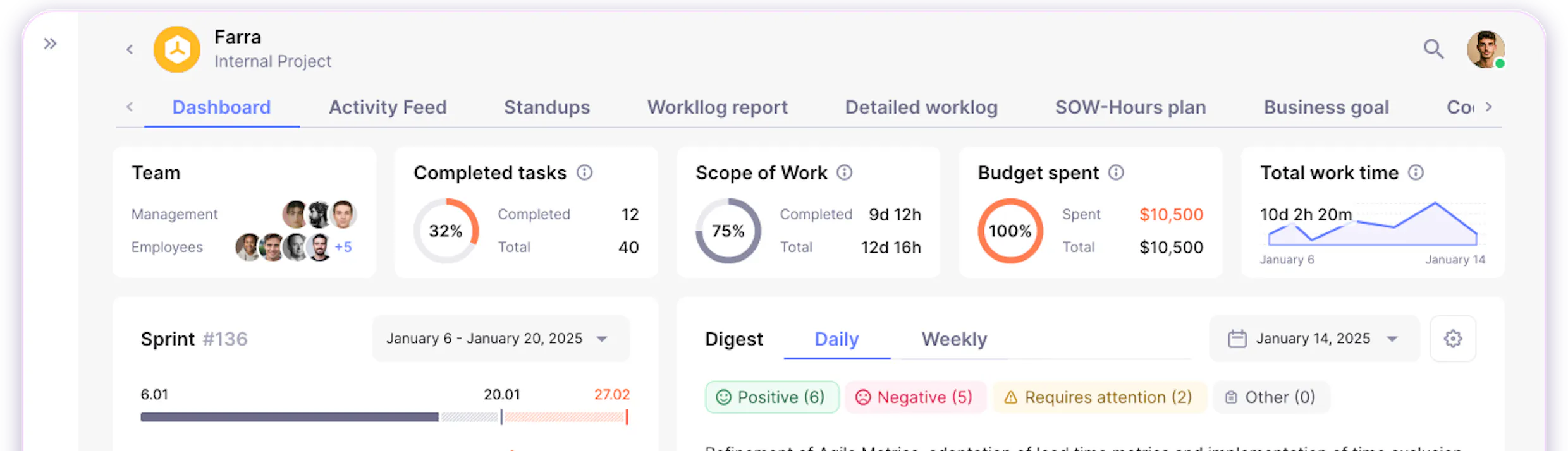
When these signals are aggregated in a single dashboard and monitored by an AI agent configured to alert on threshold breaches, leadership has a real-time health check without scheduling a status meeting.
AI project management in practice: use cases by team type
Outsourced development: client transparency without manual reporting
An outsourcing company running six client projects simultaneously faces a predictable problem: each client wants status updates, each PM produces them manually, and by the time a report lands in a client's inbox, it is already partially outdated.
With AI project management, data from Jira, GitHub, and worklogs feeds automatically into scheduled client-facing reports configured to run weekly. The PM Agent answers client-facing questions about progress, blockers, and budget consumption in real time. Budget alerts fire when a project crosses 80% of its SOW allocation – before the client discovers an overrun.
Result: PM time on reporting drops from 3-4 hours per client per week to under 30 minutes of review and approval. Client relationships improve because responses to ad-hoc status questions arrive in minutes rather than by the end of the day.
Product SaaS team: connecting sprint delivery to OKR progress
A 40-person SaaS engineering team runs quarterly OKRs but has no reliable way to track whether sprint work is actually moving the needle on key results. Features ship on time, but whether they shift the metrics the OKR references is invisible until the quarterly review.
With AI-based project management, each sprint's scope is mapped to relevant OKRs at project setup. Delivery metrics are correlated with product analytics automatically. The PM Agent can answer "Are we on track to hit our Q3 activation OKR?" based on current sprint velocity, feature completion rate, and post-launch adoption data.[10][1]
Result: The quarterly review stops being a retrospective exercise and becomes a check on real-time progress. Leadership can make scope adjustments mid-quarter with full data context rather than gut feel.
Enterprise IT: multi-project portfolio visibility
An enterprise IT department runs 15+ simultaneous projects with different teams, tools, standards, and stakeholders. The CPTO has no single view of portfolio health. Each PM runs their own reporting cadence, format, and toolset.
AI project management addresses this by connecting to each team's existing toolset (Jira, Azure DevOps, Linear, GitHub) and normalizing data into a unified portfolio dashboard. The PM Agent can be queried across all projects simultaneously: "Which three projects have the highest risk exposure this week?" delivers a ranked answer with data-backed rationale, not a subjective list.[12][1]
Result: Portfolio steering becomes data-driven. Projects that need attention are identified before they require an escalation meeting.
Fintech and regulated industries: audit trail through AI
A fintech team building a regulated payment feature needs full traceability of who decided what, when, and why. Manual audit trails are incomplete and time-intensive to reconstruct.
AI project management with integrated communication and document connectors (Slack, Confluence, Google Docs, meeting transcripts) creates a continuous, timestamped record of project activity across tools. The PM Agent can reconstruct the decision context for any period – who was in the meeting where the scope was changed, what the PR review said about a security consideration, which standup first surfaced the compliance concern.[4][10]
Result: Audit preparation time drops dramatically. Compliance reviews draw on objective, timestamped data rather than reconstructed memory.
Ready to see AI project management in action?
What to avoid when implementing AI project management?
Using AI as a dashboard without a context layer
The most common failure pattern: connecting an AI tool to project data, then asking it questions – and receiving plausible-sounding but inaccurate answers. This happens when the AI agent lacks a structured knowledge base (Project Brain) that encodes company terminology, project rules, team structure, and business context.
An agent without context can only work with raw data. It cannot know that "done" in your workflow means "deployed to staging and QA-approved," not just "moved to the Done column." It cannot be known that "Client A" refers to a specific contract with specific financial terms. Without this context, responses will be generic and sometimes wrong.[11][4]
The fix: Before querying the agent, invest time in building project context – goals, rules, team configuration, glossary. Treat this as a setup cost, not overhead.
Implementing without integration to real tools
AI project management has zero value if it operates on stale data. An AI system fed weekly exports from Jira and manual CSV uploads will produce answers about what happened last Thursday, not what is happening now. The entire value proposition of AI-based management is continuous signal processing.
Proper implementation connects directly to the live API of every tool the team uses: task trackers, code repositories, communication platforms, calendar systems, and worklogs. Data freshness is not a nice-to-have – it is the foundation.[4][1]
Reporting for reporting's sake
AI makes it trivially easy to generate reports. That ease creates a trap: producing dashboards and summaries that nobody acts on. If a scheduled report lands in a Slack channel and generates no decisions, it is consuming system resources without producing value.
Every report and alert should be tied to a specific decision or action. Before configuring automated reporting, define: who receives this, what decision it informs, and what threshold would trigger a different action. Reports without owners and without decision triggers are noise.[3]
Replacing processes instead of augmenting them
AI project management works best layered on top of existing workflows, not as a wholesale replacement. If a team's Jira hygiene is poor, an AI agent will surface poor-quality insights. If standups are inconsistently updated, capacity signals will be unreliable.
The right approach is to use AI to reduce the cost of good process hygiene – automated reminders, inactivity alerts, standup prompts – while preserving the human workflows that generate the data the agent depends on.[1]
Ignoring human-in-the-loop requirements
A well-designed AI agent is explicit about the limits of its knowledge. When data is incomplete, when context is ambiguous, or when a question requires human judgment, the agent should say so directly – rather than generating a confident-sounding answer that may be wrong.
Teams should configure their AI tools to distinguish between data-backed answers and inferences, and to flag uncertainty explicitly. Decisions with significant business consequences – scope changes, budget reallocation, team restructuring – should always be validated by a human with full context before execution.[11]
How does Enji bring AI to your engineering projects?
Enji is purpose-built for AI-assisted project management in engineering organizations. Its architecture connects to the tools teams already use and processes their data through a context-aware AI layer, delivering answers and insights without requiring manual reporting or context-switching.[1]
PM Agent
The PM Agent is Enji's core AI assistant – an always-on agent that answers questions about project status, risks, blockers, team capacity, budget consumption, and project margins through a conversational interface. It works 24/7 based on real project data from connected integrations: Jira, GitHub, GitLab, Bitbucket, Linear, Azure DevOps, Slack, Telegram, Google Meet, Google Calendar, Microsoft Teams, Confluence, and Google Docs.[13][10][11][4][1]
Example questions PM Agent answers in under a minute:[4]
- "Will we meet our deadline at current velocity?"
- "What did the frontend team do this week?"
- "Which projects are at budget risk right now?"
- "Show me bottlenecks from the last sprint."
- "Analyze team performance from [date] to [date]."
PM Agent 3.0 (released April 2026) processes complex queries – including large projects with thousands of tasks and hundreds of team members – in under one minute. Every response includes specific numerical data, not vague summaries, along with clickable links to the tasks and data sources it references.[4]
From manual tracking to
autonomous project visibility

Project Brain
Project Brain is the contextual knowledge layer that enables PM Agent to be accurate. It stores project goals, rules, terminology, contacts, and internal documentation in a structured format accessible to the agent at query time. It ingests content from Confluence wikis and Google Docs alongside live project activity data, so the agent's answers are grounded in company-specific context rather than generic interpretations.[10][4]
The practical impact: when the agent answers "is Project X on track?", it knows what "on track" means for that specific project – the defined completion criteria, the client's priority list, the team's capacity constraints – not just whether tickets are moving.[1]
Signals (Automated Alerts)
Enji's Signals feature monitors project data against configurable thresholds, and fires alerts when risks emerge – budget overruns, deadline proximity, team inactivity, WIP spikes, capacity drops. Alerts are delivered through the communication platforms teams already use (Slack, Telegram, email), so they arrive in context rather than requiring a tool switch.[4][1]
This is the leading indicator layer in practice: instead of a PM checking dashboards every morning, the system surfaces the signal the moment it crosses a threshold, giving maximum lead time for a response.
Scheduled Reports
Enji's scheduled report system delivers automated project summaries at configurable intervals – daily standups, weekly project health reports, monthly executive summaries – without PM involvement in data collection or formatting. Reports are generated from live project data, include charts and numerical detail, and are delivered to the recipients configured at setup time.[4][1]
For engineering managers running multiple projects, this eliminates the Monday-morning reporting ritual. For CTOs and VPs, it delivers a current picture of portfolio health at a consistent cadence without scheduling a status meeting.
Process Builder
Process Builder allows teams to encode repeating workflows – onboarding sequences, recurring task creation, scheduled reviews, milestone reminders – into automated processes that execute without manual triggering. This is where operational reliability comes from: predictable processes run predictably, without depending on someone remembering to do them.[4]
Frequently asked questions about AI project management
What is the difference between AI project management and traditional project management?
Can AI project management work without replacing existing tools like Jira or Slack?
How does an AI project management agent know the current status of a project?
What data does AI project management use to generate reports?
How accurate are AI-generated project status summaries?
What are leading and lagging indicators in AI project management?
How does AI project management help with resource allocation?
Is AI project management suitable for distributed or remote teams?
What should I configure before using an AI project management agent?
How does AI project management handle projects with incomplete data?
References
- What Is AI Project Management? | Enji Glossary — Core definition, methodologies, and the application of AI agents in engineering delivery.
- What is Project Health? | Enji Glossary — Methodology for tracking a project's overall status across progress, performance, and strategic alignment.
- How to Automate Project Status Reports | PPM Express — Analysis of time-saving strategies through automated project status generation.
- Enji Release Notes: AI Gets Smarter (April 15, 2026) — Overview of PM Agent 3.0 capabilities, including structured responses, task links, and sub-minute query processing.
- Case Study: Automating Status Reports for a 50-Person Program | Self-Made PM — Documented reduction of weekly reporting overhead from 12 hours to 90 minutes via AI automation.
- Why Status Reports Take 90 Minutes Every Week | OnPlana — Breakdown of the 60-120 minutes PMs typically spend on manual weekly documentation.
- Why Project Status Updates Are Wasting Your Team's Time | In-Parallel — Exploration of systemic inefficiencies in manual weekly status reporting rituals.
- AI in the Project Management Industry Statistics | ZipDo Reports — Research indicates that 78% of project teams using AI successfully reduce administrative busywork.
- Enji Release Notes: PM Agent Full-Screen & Task Fixes (June 16, 2026) — Updates on the full-screen PM Agent interface and transparent request processing.
- Google Docs Integration and Faster Reports (May 13, 2026) — Details on expanded PM Agent context capabilities through document integration and faster reporting.
- What Is an AI Copilot? | Enji Glossary — Definitions of AI Copilot concepts and how they interact with engineering data workflows.
- Enji Release Notes: PM Agent Updates (August 19, 2025) — Implementation of automatic ML-driven chat naming and improved project access controls.
- Enji Release Notes: Smarter Project Start (February 17, 2026) — Enhancements to project creation, guided setups, and initial data integrations for PM Agent.


Последнее обновление: июнь 2026 г.